This is a neat trick that I was unaware of until the other day. Have you Fiddler to look at your web traffic? Fantastic tool right? You can get it here http://www.fiddler2.com/fiddler2/ it is free debugging proxy.
Anyhows... I wanted to test some local web development but to my frustration initially it like you cannot debug this local traffic. You can though, simply use http://localhost./ instead of http://localhost/ in your addressing and bingo... cool huh?
Showing posts with label How to. Show all posts
Showing posts with label How to. Show all posts
Wednesday, 16 December 2009

Sunday, 13 December 2009
How do you get Firefox to show HTML LI list items like IE?
Earlier this week I had a web page that would not render quite properly under firefox, it had a list of bullet points that were in fact placed inside a TD cell and it just looked like the bullets were not centered in the cell.
Embarassingly enough I cannot remember the precise code to reproduce the layout here, which if I get some time will give you a code sample so you can see what happened. I initially though I could solve the problem using appropriate padding and margins for just Firefox but I'm pleased to say rather than using that hack I spotted the real problem.
For whatever reason, and I don't know if IE or Firefox is at fault I noticed that the IE list items had a property of list-item-position set to inside - where as Firefox was set to outside. Changing my firefox stylesheet to use list-item-position:inside solved the problem!
Embarassingly enough I cannot remember the precise code to reproduce the layout here, which if I get some time will give you a code sample so you can see what happened. I initially though I could solve the problem using appropriate padding and margins for just Firefox but I'm pleased to say rather than using that hack I spotted the real problem.
For whatever reason, and I don't know if IE or Firefox is at fault I noticed that the IE list items had a property of list-item-position set to inside - where as Firefox was set to outside. Changing my firefox stylesheet to use list-item-position:inside solved the problem!
How do you write HTML to appear in your blog?
Now and again, especially if writing about code you will want to display an example of source code in your blog, and if you are writing about HTML you may want to display some tags. If you are using Blogger, or mny other blogging tools it is likely instead of showing you HTML example the blog software will process the tags and render the output rather than displaying the code. How do you get round this?
Two things, first and most simply for any source code use the <code> tags.
Second, more especially for HTML use the following < for < less-than symbols and use > for all > greater than symbols. This will allow your source to appear on the page and not get processed:
<table>
<tbody>
etc etc...
Two things, first and most simply for any source code use the <code> tags.
function foobar(){ return true;}Second, more especially for HTML use the following < for < less-than symbols and use > for all > greater than symbols. This will allow your source to appear on the page and not get processed:
<table>
<tbody>
etc etc...
How do you get a HTML table TD cell to wrap consistently?
I have just had some fun working with a HTML table. I just a table with five cells each of which I had initially set widths on each TD element. When the data for each cell was less than the predefined widths everything displays fine but as soon as the data exceeds the width I found the cell sometimes wrapped but usually kept the table expanding (The data I was trying to get to wrap was a URL - so just a continuous string without spaces) I think had the data included spaces the mishaped table would not have been so bad.
The solution I found was to embed a DIV within each TD that I wanted tied to a specific width - and within the DIV style or CLASS set a width explicitly. This found kept the table aligned!
The solution I found was to embed a DIV within each TD that I wanted tied to a specific width - and within the DIV style or CLASS set a width explicitly. This found kept the table aligned!
<table>
<tbody>
<tr>
<td width="100px">
</td>
<td width="200px">
   <div>class="widthclass" OR style="width:200px">
        data....
   </div>
</td>
</tr>
</tbody>
</table>
How do you get CPanel to create an email account that works with Outlook?
I have been using Cpanel on a number of hosts for a while now and had never had any problems. I have a domain, want an email address, just create a new account and set a password. CPanel then lists the details that need to connect via an email client and you are away.
Although I have noticed the details CPanel give you back are slightly incorrect, such as the user name appearing as name+domain rather than name@domain - but easy to rectify none the less.
Unfortunately the last account I added didn't connect from the client - it worked from the webmal link but not my outlook client. Annoying very annoying!
The solution, in this case was to reset my password making sure that all the characters used were lower case! What a pain that was, especially since you expecially when I expected the issue to be related to server names, ports or that kind of stuff!
If you are having problems give this a try....
Although I have noticed the details CPanel give you back are slightly incorrect, such as the user name appearing as name+domain rather than name@domain - but easy to rectify none the less.
Unfortunately the last account I added didn't connect from the client - it worked from the webmal link but not my outlook client. Annoying very annoying!
The solution, in this case was to reset my password making sure that all the characters used were lower case! What a pain that was, especially since you expecially when I expected the issue to be related to server names, ports or that kind of stuff!
If you are having problems give this a try....
Monday, 23 November 2009
Hou do you get a hyperlink to run some code instead of linking to another location?
I was just working on a web page today and the design was such that there were multiple hyperlinks, two were to other pages but the third was a function to validate a portion of the current page. My problem was, how do I run some javascript instead of setting the anchor to another page?
I first tried to use an onclick handler without a url - now this did work but as a side effect of not having a url link the hyper link was not drawn showing the underline and coloring. So I added a url but of course the onclick functioned correctly but the page then navigated away.
Finally, and successfully, if you specify javascript:functionname() in the anchor href- where functionname() is defined in the script somewhere in your html document it works a charm. Additionally, after the javascript: you actually add multiple commands as long as they are semi-colon delimited. Obviously this can get a bit messy so better to have all the code in the function but the option is there!
I first tried to use an onclick handler without a url - now this did work but as a side effect of not having a url link the hyper link was not drawn showing the underline and coloring. So I added a url but of course the onclick functioned correctly but the page then navigated away.
Finally, and successfully, if you specify javascript:functionname() in the anchor href- where functionname() is defined in the script somewhere in your html document it works a charm. Additionally, after the javascript: you actually add multiple commands as long as they are semi-colon delimited. Obviously this can get a bit messy so better to have all the code in the function but the option is there!
Monday, 9 November 2009
How you get rid of the 403 forbidden error when trying to view your web page through Visual Studio?
How you get rid of the 403 forbidden error when trying to view your web page through Visual Studio?
I was trying to view a new website I had downloaded the source for at work and then view the page through Visual Studio browse - of course trying to the page direcly via localhost did give exactly the same problem but why?
Well, although I did come across some other problems to follow in another post, check your IIS settings... Load up IIS via the control panel admin tools, navigate to the default web site - right click and select properties. Now, via the popup that appears select the documents tab - in that list check that default.aspx and index.aspx are there - are they? So initially, in a string of events, I simply didn't have the .net default pages set....
I was trying to view a new website I had downloaded the source for at work and then view the page through Visual Studio browse - of course trying to the page direcly via localhost did give exactly the same problem but why?
Well, although I did come across some other problems to follow in another post, check your IIS settings... Load up IIS via the control panel admin tools, navigate to the default web site - right click and select properties. Now, via the popup that appears select the documents tab - in that list check that default.aspx and index.aspx are there - are they? So initially, in a string of events, I simply didn't have the .net default pages set....
Thursday, 1 October 2009
how do you get that Don't cha t-shirt from the KitKat advert?
I don't know about you but I love that new kitkat advert with the bloke dancing/point to the lyrics of the pussycat dolls song, don't cha, with the lyrics printed on the tshirt! lol. I was going to say how cool but clearly I am geek LOL. To my joy though I found I could too wear the TShirt and mime to the advert.... - http://www.cafepress.co.uk/DontChaWish Has anyone found a link to the video online? I can't find it anywhere - I just have to keep the TV on : ( lol
Wednesday, 16 September 2009
How do you stop QCODO load blank pages?
I've just been doing work on a PHP web project that uses QCODO. So my client could see changes I have made I setup an installation on a server of mine. So I used the latest XAMPP to get a web server, db and php running. Secured the default security holes using the security page and then copied the source to the web root ht docs folder.
Now for a number of hours, and much hair pulling (and believe me there isn't much hair there to begin with!) Every time I tried to load a page that utilised QCODO it just loaded a blank HTML page. Not very helpful!
Firstly, I found that you can get some more useful debug info (well I say useful, let's just say some debug info) when you comment out the ob_start('__ob_callback'); line (just prefix it with //) in the qcodo.inc.php file. You can find this file under your qcodo installation folder in includes/qcodo/_core. Rerun you pages and you now get some errors relating to a date function. Thanks to some other bloggers and forum writers out there this seems purely down to the version of PHP you are running against. Of course when I set my server up I was using the latest version of XAMPP which was budled with PHP 5.3 on my devbox I used XAMPP 1.7.0 which was using PHP 5.2.8 - and this version worked.
So for me the solution at the moment was to install a compatible version of PHP. It would appear QCODO is not currently worked on, and there is another project about called QCUBED which has taken on this work - but have yet to try. I will write anoter entry on here if I ever get the time!!
Now for a number of hours, and much hair pulling (and believe me there isn't much hair there to begin with!) Every time I tried to load a page that utilised QCODO it just loaded a blank HTML page. Not very helpful!
Firstly, I found that you can get some more useful debug info (well I say useful, let's just say some debug info) when you comment out the ob_start('__ob_callback'); line (just prefix it with //) in the qcodo.inc.php file. You can find this file under your qcodo installation folder in includes/qcodo/_core. Rerun you pages and you now get some errors relating to a date function. Thanks to some other bloggers and forum writers out there this seems purely down to the version of PHP you are running against. Of course when I set my server up I was using the latest version of XAMPP which was budled with PHP 5.3 on my devbox I used XAMPP 1.7.0 which was using PHP 5.2.8 - and this version worked.
So for me the solution at the moment was to install a compatible version of PHP. It would appear QCODO is not currently worked on, and there is another project about called QCUBED which has taken on this work - but have yet to try. I will write anoter entry on here if I ever get the time!!
How do you get phpmyadmin to work after you have changed or given mysql a password?
I have recently install XAMPP on my machine which made installing Apache, MySQL and PHP a doddle. I have to confess I wouldn't of had a clue how to install these components individually and whilst I'm sure I could have located and installed them, XAMPP makes this damn easy!
Whilst XAMPP is a great tool it is for development purposes by default and openly warns you that there are some big security holes left open on installation - so don't use, certainly out of the box, as a production environment.
One of the open features of the installation is the MySQL is installed with a blank root password. Using the latest version of XAMPP there is a fantastic web page found using the security link on the \localhost\xamp page that allows you to secure folders and set a mysql root password. On an older version this assistant is not available, so me being me I setup a root password for mySQL just for neatness on my development box. Alas, after doing so the phpmyadmin page no longer longer loads because it cannot connect to the database - doh. Ok, so all you need to do to solve this is locate the config.inc.php file in the phpmyadmin folder under the xampp install folder and open the file up in a text editor. Have a look for ['Servers'][$i]['user'] = 'root' and there will also be a statement that follows that is for ['password'] = '' obviously from here you can update the password and reload your admin.
I will add, and I have to admit being unable to remember at this second, you may need to restart Apache after making this change. I would make the change, retry the page - if you retry the page and you are sure you have entered the correct credentials and it still fails then give it a restart!
Whilst XAMPP is a great tool it is for development purposes by default and openly warns you that there are some big security holes left open on installation - so don't use, certainly out of the box, as a production environment.
One of the open features of the installation is the MySQL is installed with a blank root password. Using the latest version of XAMPP there is a fantastic web page found using the security link on the \localhost\xamp page that allows you to secure folders and set a mysql root password. On an older version this assistant is not available, so me being me I setup a root password for mySQL just for neatness on my development box. Alas, after doing so the phpmyadmin page no longer longer loads because it cannot connect to the database - doh. Ok, so all you need to do to solve this is locate the config.inc.php file in the phpmyadmin folder under the xampp install folder and open the file up in a text editor. Have a look for ['Servers'][$i]['user'] = 'root' and there will also be a statement that follows that is for ['password'] = '' obviously from here you can update the password and reload your admin.
I will add, and I have to admit being unable to remember at this second, you may need to restart Apache after making this change. I would make the change, retry the page - if you retry the page and you are sure you have entered the correct credentials and it still fails then give it a restart!
How do you get past "Windows cannot access the specified device, path, or file. You may not have the appropriate permissions to access the item."?
I had copied a file to my test server Windows 2003 and tried to run it and repeatedly got "Windows cannot access the specified device, path, or file. You may not have the appropriate permissions to access the item.". I tried moving it to different locations but still no, it would not budge. I was actually connected as Administrator so permisissions should not have been a problem.
The solution,,, all I needed to do in this case was look at the file properties and noticed a security section on the general tab. Windows had identified the file coming from another machine and had blocked access to it - and of assuming you happy with the file's source and safety there is an 'Unblock' button. Click this and you are back in business!!
The solution,,, all I needed to do in this case was look at the file properties and noticed a security section on the general tab. Windows had identified the file coming from another machine and had blocked access to it - and of assuming you happy with the file's source and safety there is an 'Unblock' button. Click this and you are back in business!!
Wednesday, 26 August 2009
How to create an HTML signature in Outlook?
I have just been trying to add a banner to an HTML email. Initially I thought I would create an HTML page and then tried to link this using the Outlook signature creator pointing to the HTML file... I tried this and nothing appeared! So I can only assume my HTML which I purposely kept really simple and used tables which I had previously read would make an email more likely to work but alas not!
But, thanks to another blogger out there a fantiastically simply yet effective solution to this is to open your HTML page that displays page as you want. Then highlight the page in your browser and copy. In the Outlook signature admin, just add a new signature for editing and then paste what you have just copied into the editor and bingo, the HTML I was slaving to work is just there!!
If still not quite to your satifsfaction you can edit the resulting HTML by going to C:\Documents and Settings\\Application Data\Microsoft\Signatures and in there you will find your signature file as an .htm So once you are roughly happy with the appearance in the signature editor you still go back to the htm file and now tweak as needed. So I found this a really easy way to do it!
But, thanks to another blogger out there a fantiastically simply yet effective solution to this is to open your HTML page that displays page as you want. Then highlight the page in your browser and copy. In the Outlook signature admin, just add a new signature for editing and then paste what you have just copied into the editor and bingo, the HTML I was slaving to work is just there!!
If still not quite to your satifsfaction you can edit the resulting HTML by going to C:\Documents and Settings\
Friday, 21 August 2009
How do you populate a new email from an HTML onclick code?
I have used HTML links before with the href set to mailto:address@blah.com, which always work a treat. Today though needed the same functionality as a straightforward mailto link but via an onclick event of a DIV I'm using as a button.
Not difficult once you know how, and I also found out a couple of neat new tricks for populating the mail client with values.
All the onclick code requires is:
onclick="self.location = 'mailto:help@selfhelpsupemarket.com'"
Not difficult once you know how, and I also found out a couple of neat new tricks for populating the mail client with values.
All the onclick code requires is:
onclick="self.location = 'mailto:help@selfhelpsupemarket.com'"
Simply append to the mailto: email address a query string using cc, bcc, subject and or body fields to pre-populate the client mail message with the appropriate fields filled. All the fields are optional so you only need to use the fields appropriate to your task. All fields and values need to be separated with ampersand.
A couple of examples:
mailto:steve@t.com?subject=hello from website&cc=info@test.com
So create a new email to be sent to steve@t.com, cc'd to info@t.com with a subject of hello from website.
mailto:steve@t.com?subject=hello from website&body=Dear Steve,
This one will create a new message again to steve@t.com with the same subject but the message body is started with Dear Steve.
How do you subscript or superscript html text without affecting the paragraph line spacing?
Bit of a long title today but a simple request!
I have only one character in some text that I would like to subscript. Initially I used html 'sub' element which I can't deny does work but if you have multiple lines of text the line that displays the subscript will end up having a greater line height than the others which in my pedantic world caused nightmares!
Let's see if I can demonstrate here:
line1 with a subscript number 1 after line
some other lines follow this one without any super or sub script features.
some other lines follow this one without any super or sub script features.
There is another way though which now allows me to sleep at night : ) hurrah. Simply use a span around your subscript item (or super) and set it style to:
position: relative;top: 0.3em;
from this you can obviously change the top value to choose the character position and in fact make it superscript. Here is the updated version below:
line1 with a subscript number 1 after line
and some superscript using a top of -0.3em easy.
some other lines follow this one without any super or sub script features.
better?!
I have only one character in some text that I would like to subscript. Initially I used html 'sub' element which I can't deny does work but if you have multiple lines of text the line that displays the subscript will end up having a greater line height than the others which in my pedantic world caused nightmares!
Let's see if I can demonstrate here:
line1 with a subscript number 1 after line
some other lines follow this one without any super or sub script features.
some other lines follow this one without any super or sub script features.
There is another way though which now allows me to sleep at night : ) hurrah. Simply use a span around your subscript item (or super) and set it style to:
position: relative;top: 0.3em;
from this you can obviously change the top value to choose the character position and in fact make it superscript. Here is the updated version below:
line1 with a subscript number 1 after line
and some superscript using a top of -0.3em easy.
some other lines follow this one without any super or sub script features.
better?!
Thursday, 20 August 2009
How do you change the size of the rectangle margue in Photoshop Elements?
I have just been working on some images in the Photoshop Elements again and it has always annoyed me that when I use the rectangle selection tool, that once I let go of the mouse I cannot change its size, only move it. I doubted you couldn't I just didn't know how - a big difference!
I have discovered once you have let go of the mouse while using the selection tool (I noticed this works for the crop tool too - and no doubt others) you really cannot resize the selection BUT if you keep the mouse button down - and then press and hold the spacebar, when you do this the selection moves, let go of the spacebar and the selection resizes again. Do all of this while keeping the mouse button down.
I used to find myself selecting part of the screen and getting a rough size right but found I was a few pixels out and then would try to resize the selection - and this really doesn't work. So using the technique above allows you to get the surrounding size about right, find you are a few pixels out and then use the spacebar move option to nudge those pixels out and then release the bar and resize the image back again. Neat!
Whilst not difficult it did take a few goes to perfect the technique since my mind was still thinking draw the shape and then, after a coffee perhaps, go back and resize!!
I have discovered once you have let go of the mouse while using the selection tool (I noticed this works for the crop tool too - and no doubt others) you really cannot resize the selection BUT if you keep the mouse button down - and then press and hold the spacebar, when you do this the selection moves, let go of the spacebar and the selection resizes again. Do all of this while keeping the mouse button down.
I used to find myself selecting part of the screen and getting a rough size right but found I was a few pixels out and then would try to resize the selection - and this really doesn't work. So using the technique above allows you to get the surrounding size about right, find you are a few pixels out and then use the spacebar move option to nudge those pixels out and then release the bar and resize the image back again. Neat!
Whilst not difficult it did take a few goes to perfect the technique since my mind was still thinking draw the shape and then, after a coffee perhaps, go back and resize!!
Tuesday, 18 August 2009
How do you change the mouse cursor using CSS?
An easy one for all the HTML and CSS gurus out there, but up until today I wasn't even aware you could change the cursor on an HTML page using CSS.
So earlier on, I have a number of DIVs that are in effect some large buttons which I have added some hover code to show highlighting etc, which of course led me to ideally need to change the cursor so the user knows clicking will be applicable. All you need is to set the cursor style to pointer - in the case a hand for links e.g
.mylink {cursor:pointer}
Now of course there are a load of other cursor values - auto, crosshair, default, e-resize, help, move, n-resize, ne-resize, nw-resize, pointer, s-resize, se-resize, sw-resize, text, wait, w-resize. Which most are fairly self explanatary I think but at least you can change them now!
Finally, and I havn't tried this but you can even go so far as providing yor own cursors! You do this specifying a url in the CSS cursor:url('path to cursor'). I haven't tried this, and may not need to, but if I do I will add new a post!!
So earlier on, I have a number of DIVs that are in effect some large buttons which I have added some hover code to show highlighting etc, which of course led me to ideally need to change the cursor so the user knows clicking will be applicable. All you need is to set the cursor style to pointer - in the case a hand for links e.g
.mylink {cursor:pointer}
Now of course there are a load of other cursor values - auto, crosshair, default, e-resize, help, move, n-resize, ne-resize, nw-resize, pointer, s-resize, se-resize, sw-resize, text, wait, w-resize. Which most are fairly self explanatary I think but at least you can change them now!
Finally, and I havn't tried this but you can even go so far as providing yor own cursors! You do this specifying a url in the CSS cursor:url('path to cursor'). I haven't tried this, and may not need to, but if I do I will add new a post!!
How do you get an image to appear in an DIV, paths?
This is a silly one. I have used without a problem the CSS background-image: statement including backgrounds for DIVs, until today that is....
I have an html document in the root folder, along with two sub folders: a resorces folder for my stylesheet style.css and an images folder for all the images. Before the lightbulb switched on I referenced my images as background-image:url('images/image_name.jpg') BUT to my frustration for a good half an hour was the images did not appear - now I was trying to use a background for a DIV but it could have been any images.
The light bulb moment - I feel daft for admitting to the problem but I have seen it before and still did not remember... so the issue is simply this - the path used is relative to the stylesheet loaded and NOT the HTML document as I imagined. So, I originally used '/images/imagename.jpg' which is relative to the html, and what I needed for it to work was actually a path like '../images/imagename.jpg' which is because the stylesheet is in a resources folder, so the path needs to be a parent folder above before navigating to the images folder.
Like I said a real simple one to solve, but when I was convinced in my mind the path should be relative to the root folder it took quite a bit of head bashing to get it fixed!
I have an html document in the root folder, along with two sub folders: a resorces folder for my stylesheet style.css and an images folder for all the images. Before the lightbulb switched on I referenced my images as background-image:url('images/image_name.jpg') BUT to my frustration for a good half an hour was the images did not appear - now I was trying to use a background for a DIV but it could have been any images.
The light bulb moment - I feel daft for admitting to the problem but I have seen it before and still did not remember... so the issue is simply this - the path used is relative to the stylesheet loaded and NOT the HTML document as I imagined. So, I originally used '/images/imagename.jpg' which is relative to the html, and what I needed for it to work was actually a path like '../images/imagename.jpg' which is because the stylesheet is in a resources folder, so the path needs to be a parent folder above before navigating to the images folder.
Like I said a real simple one to solve, but when I was convinced in my mind the path should be relative to the root folder it took quite a bit of head bashing to get it fixed!
Saturday, 15 August 2009
How do you know what all the new office 2007 extensions are?
I have just been sent an Excel document with an .xlsm extension and wondered what the heck this meant. With a bit of a search this is a 2007 open XML format with macros enabled, so an xlsx document is without macros.
This microsoft link clears up the what and why of the new extensions here: http://office.microsoft.com/en-us/help/HA100069351033.aspx?pid=CH102457411033
On a similar note if you need to open said new formats in an earlier version of Office you can do by using this compatibility pack here - http://www.microsoft.com/downloads/details.aspx?displaylang=en&FamilyID=941b3470-3ae9-4aee-8f43-c6bb74cd1466 I have been using this with an Office 2003 installation and it does seem to work well. The only thing is there is a noticable time lag opening and saving the files - which based on the conversion work to bedone I guess this is no surprise.
Reading the above document, the Office 2007 release includes a feature to inspect a document for personal information. So within Excel if you load a document, click the Office button, selct prepare and then inspect document - it will then all you remove all personal references from the saved document, very neat. Have a look here for the complete details. http://office.microsoft.com/en-us/help/HA100375931033.aspx
This microsoft link clears up the what and why of the new extensions here: http://office.microsoft.com/en-us/help/HA100069351033.aspx?pid=CH102457411033
On a similar note if you need to open said new formats in an earlier version of Office you can do by using this compatibility pack here - http://www.microsoft.com/downloads/details.aspx?displaylang=en&FamilyID=941b3470-3ae9-4aee-8f43-c6bb74cd1466 I have been using this with an Office 2003 installation and it does seem to work well. The only thing is there is a noticable time lag opening and saving the files - which based on the conversion work to bedone I guess this is no surprise.
Reading the above document, the Office 2007 release includes a feature to inspect a document for personal information. So within Excel if you load a document, click the Office button, selct prepare and then inspect document - it will then all you remove all personal references from the saved document, very neat. Have a look here for the complete details. http://office.microsoft.com/en-us/help/HA100375931033.aspx
Monday, 10 August 2009
How do you change an Excel Row to a Column?
I can't believe how easy this actually is but until I knew I was left working out how to use formulas to do this, and you really don't need to. Initially, I was over the moon an quite proud having written a formula to do this but now I'm just red with embarassment - and as the KISS principal prevails!
Ok, so you have a row of data that would now like to work with as column. Firstly, just select the row of data you wish to convert and edit->copy. Select the cell you want you new column of data to start and use Edit->Paste Special (Or if you are using 2007 just use the right click over the cells you are working with) and then click the transpose checkbox on. Press OK and you are away! Easy eh?!!
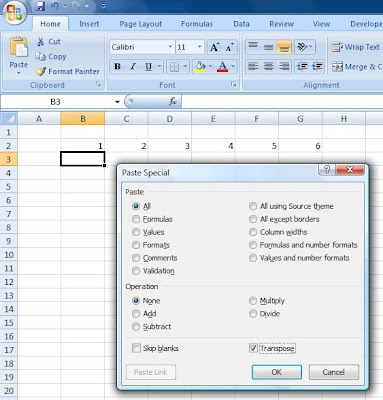
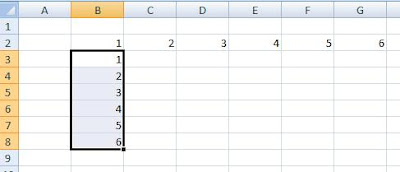
Ok, so you have a row of data that would now like to work with as column. Firstly, just select the row of data you wish to convert and edit->copy. Select the cell you want you new column of data to start and use Edit->Paste Special (Or if you are using 2007 just use the right click over the cells you are working with) and then click the transpose checkbox on. Press OK and you are away! Easy eh?!!


Thursday, 6 August 2009
How to switch on Joomla debugging... resolving problems
As I mentioned in my previous post I managed to get to a situation where every time I loaded the home page it loaded a 404 error. Now trying to search the web for a solution for a Joomla 404 error, as you can imagine results in a couple of pages!!
So I spotted by chance the debug option in Site->Global Configuration->System
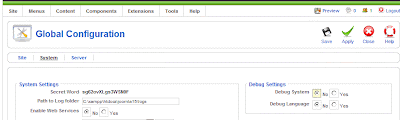
Now if you switch the debug system on and apply changes you will notice all further interaction with Joomla will result in a load of debug information being displayed. All well and good! So now this information is showing I reloaded my home page and the resulting 404 error includes some debug information - hurrah!
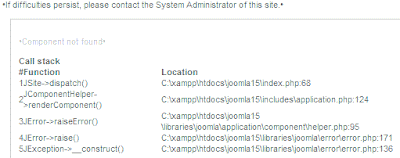
So finally, armed with this new information I could see prior to the JError->raiseError() call, a call to JComponentHelper->renderComponent() which I then Googled to find precisely why my page wasn't loading!! I'm well aware the error was a really silly mistake (a missing default menu) but had I not found this option I could have been looking around for a solution for quite a while.
So I spotted by chance the debug option in Site->Global Configuration->System

Now if you switch the debug system on and apply changes you will notice all further interaction with Joomla will result in a load of debug information being displayed. All well and good! So now this information is showing I reloaded my home page and the resulting 404 error includes some debug information - hurrah!

So finally, armed with this new information I could see prior to the JError->raiseError() call, a call to JComponentHelper->renderComponent() which I then Googled to find precisely why my page wasn't loading!! I'm well aware the error was a really silly mistake (a missing default menu) but had I not found this option I could have been looking around for a solution for quite a while.
Subscribe to:
Posts (Atom)